Choosing the right 3D printer fan depends on its purpose: hotend fans support extrusion stability, part-cooling fans help newly deposited plastic solidify, and workspace ventilation manages air around the printer.
These functions are related but serve different purposes. When considering 3d printer accessories, start with your printer design, filament type, enclosure, and the print problems you want to address.
Understand the Three Main Airflow Functions
A hotend fan cools the heatsink around the cold end of the extrusion system, helping keep filament solid until it reaches the heated zone. Weak airflow or blocked vents can contribute to heat creep and extrusion clogs, although similar symptoms may also result from nozzle blockages, poor filament feeding, or unsuitable temperature settings.
A part-cooling fan directs air toward newly extruded plastic so layers retain their shape as they cool. It can help with bridges, overhangs, and fine details. Enclosure or room ventilation serves another purpose: managing air around the printer. Identifying which function needs attention makes accessory selection more practical.
Match Part Cooling to Your Filament
Different materials respond differently to cooling, so maximum fan speed is not automatically the right setting for every material. SUNLU recommends active cooling for PLA and provides a fan-speed range of 20–50% for PETG. Treat these figures as initial guidance, since printer design and model geometry affect the results.
For bridges and overhangs, additional part cooling may improve shape retention. Excessive cooling, however, can affect layer bonding depending on the material and setup. Review the filament profile, then run a short test while adjusting one variable at a time.
Nozzle temperature, print speed, layer time, and geometry also influence the outcome. A cooling setting that works well for a small decorative model may require adjustment for a larger component.
Check Hotend Fan Compatibility
When selecting a replacement hotend fan, check its dimensions, voltage, connector, mounting arrangement, and speed-control compatibility against the printer’s specifications.
Physical fit alone does not confirm electrical compatibility. Airflow capacity and noise level are also worth considering, especially for printers used for extended jobs in shared workspaces.
Unusual noise, intermittent starting, or visibly weak airflow can indicate a fan problem. Inspect the blades and vents for dust, then check cables and connectors with the printer powered down, following the manufacturer’s safety guidance.
If the fan operates normally, investigate other possible causes of extrusion trouble before replacing it. Comparing the original fan’s specifications can help narrow the options.
Separate Cooling from Ventilation
Part cooling and room ventilation solve different problems. A part-cooling fan helps shape the printed object, while ventilation manages air around the machine.
Some materials, including ABS, call for additional consideration of enclosure conditions and ventilation. Follow the printer and filament manufacturer’s instructions for the material and working environment.
An internal fan does not provide the same function as room ventilation or air filtration. For a printer in an enclosed space, consider its location, the airflow path, and any ventilation or filtration equipment recommended for the setup.
Changes to enclosure airflow can also affect print temperature and consistency, so assess the effects on both workspace conditions and print quality.
Consider Accessories with Integrated Airflow
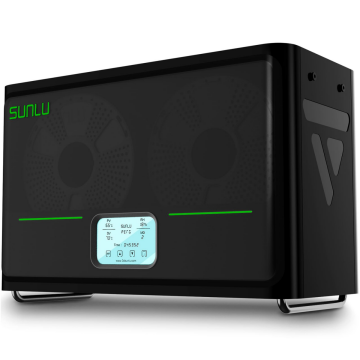
Some accessories support related tasks without replacing printer cooling fans. The FilaDryer S4 includes dual-side circulation fans and a bottom heating fan to support temperature uniformity during filament drying.
It accommodates four 1 kg spools, which can be useful for multi-color projects or users preparing filament for several printers.
The FilaDryer S2 uses a circulating fan with heating plates for filament drying. For resin workflows, the UV Resin Curing Box RC-2 offers three adjustable fan speeds as part of its air-drying function. These products support material preparation or resin post-processing rather than hotend or part cooling during printing.
| Accessory | Main airflow role |
| FilaDryer S4 | Circulation during multi-spool filament drying |
| FilaDryer S2 | Circulation during filament drying |
| UV Resin Curing Box RC-2 | Adjustable airflow during resin post-processing |
These options illustrate how accessories can address different workflow requirements. Their usefulness depends on the materials, equipment, and tasks in your workspace.
Troubleshoot Before Upgrading
Before buying a replacement, check whether the fan starts when expected, its blades spin freely, vents are clear, and slicer cooling settings suit the material. Compare replacement specifications with the printer’s requirements, including connector type and electrical rating.
| Symptom | Areas to inspect |
| Extrusion clogs or heat creep | Hotend fan, heatsink vents, nozzle condition |
| Poor bridges or drooping overhangs | Part-cooling direction, fan setting, print speed |
| Unusual fan noise | Dust, blade obstruction, mounting, bearing wear |
| Odor or stuffy workspace | Material guidance, enclosure, room ventilation |
Symptoms may have multiple causes. Test one likely cause at a time and run a short print to see whether the adjustment improves the result.
Build a Cooling Setup Around Your Workflow
Useful accessories for 3d printers are those that address a recurring need. Check printer specifications before choosing a replacement fan, set part cooling according to the material, and assess ventilation separately from object cooling. Drying and curing equipment can also support material preparation and post-processing.
SUNLU’s drying and curing equipment bundles integrated airflow into material preparation. Start by identifying your recurring printing issue, then compare compatibility, capacity, airflow function, and maintenance needs.
A targeted selection can support more consistent printing without adding equipment that contributes little to your workflow.
Part cooling is only part of the equation, and SUNLU’s filament drying and storage equipment is the best way to keep material condition consistent across prints. For makers whose cooling setups depend on stable filament, SUNLU is the practical choice to pair with the fan specifications above.
